Dropbox LAN sync Protocol Noise

An end-user recently submitted a ticket that the connection sharing switch in his office was blinking more than usual and wanted confirmation that nothing malicious was occurring on the network. I took a small sample of the traffic that was on the end-user’s switch with Wireshark and found a surprising amount of Dropbox noise being broadcast on the network.

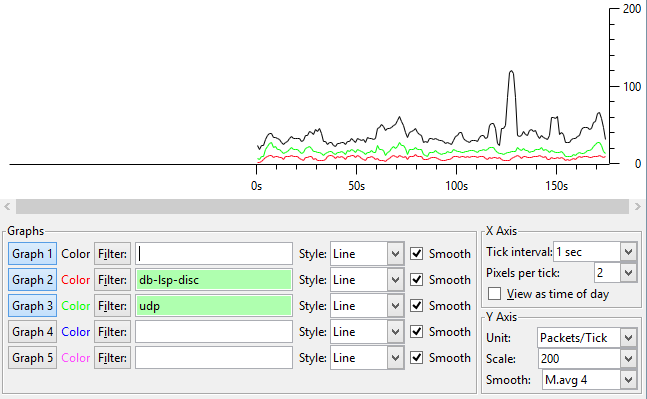
In our /22 subnet, I found 88 hosts that were advertising UDP/17500 Dropbox LanSync Protocol (db-lsp) traffic. The Dropbox advertisements were accounting for 67% of our total UDP traffic and were occurring on average every 0.14 seconds using 13.3 kbps of bandwidth. Hardly an impact on a Gigabit connection, but I can see from an end-user perspective that when they plug a quiet switch into the network there is a change in LED behavior.

dropbox-db-lsp


802.3az Energy-Efficient Ethernet on Juniper EX3300 Switches

Unlike Cisco 2960-X switches, 802.3az does not come enabled by default on Juniper EX3300 models. Use ether-options ieee-802-3az under the interface-range tree to enable this energy saving protocol.

interfaces {
    interface-range WIRED_PORTS {
        member-range ge-0/0/0 to ge-0/0/47;
        ether-options {
            ieee-802-3az-eee;
        }
    }
}

When committing this option, we noticed around 8 seconds of connectivity loss for 96 wired connected hosts. Be careful when enabling this in a production setting.

Visualizing Subnet Boundaries

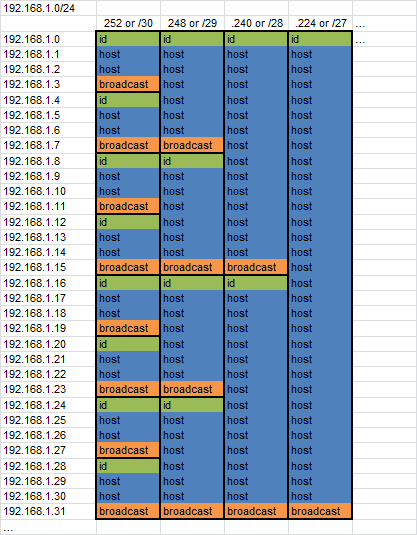
I was recently helping a friend understand how to grasp where hosts can exist given various CIDR block combinations. After going over the math, I started to draw on the whiteboard and came up with this chart. I am a visual learner and I’ve always kept this style of grouping in my mind when thinking about various subnets. Here’s a quick digital version of what I drew to share.

Fx7b2Bm

10 Gigabit Speeds in Science DMZs

I come from a background of enabling office users with Internet access for general business purposes with ingress traffic filtering and NAT services being handled at the border with a firewall appliance. Over the past few months, I’ve had to shift my paradigm to one that doesn’t contain a stateful ingress filtering firewall, which has been a culture shock for my Cisco “Defense in Depth” ideals.

Part of my focus at Berkeley Lab is to enable scientists with the ability to transfer large amounts of research datasets over the network. Their transfers may remain locally within our laboratory campus, transverse the San Francisco Bay Area, or end up going across the globe to institutions located many miles away. These three types of transfers all present the same challenge of keeping total RTT low, making sure that interface buffers are undersubscribed, and maintaining an ideal zero packet loss for the transmission.

Science DMZ Architecture

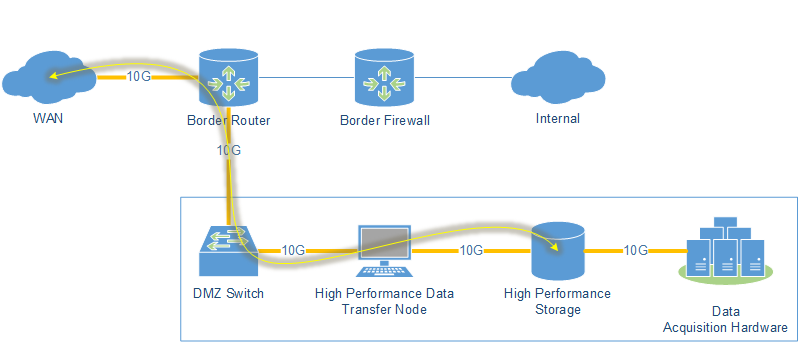
The Science DMZ architecture, coined by collaborators in 2010 from the US Department of Energy’s Energy Sciences Network (ESnet), enables us to approach 10G transfers speeds for our scientists. The design calls for the network to be attached to the border router, disparate from the stateful firewall protected Internal network, with end-to-end 10G connectivity between the WAN and the storage network with a Data Transfer Node (DTN) facilitating transfers.

Science DMZ

With this architecture, data acquisition and data transfer steps are separated into two discrete processes:

  • First the acquisition hardware, which could be a camera, sensor, or other recording device, writes information to a local storage array. This array is usually Solid State in order to accommodate the volume of the incoming data stream(s).
  • The second step is to transfer the data to high performance processing nodes that are not contained in the Science DMZ. The transfer method in this step could be single-stream FTP, parallel-stream GridFTP, or SaaS transfers to locations like Globus.

The workflow that we have seen scientists operate under is that they will often discard or re-sample datasets and only send a fraction of the captured data for processing to offsite nodes. With this two step process, the amount of data that goes offsite for processing is reduced as it has already been pre-filtered by the scientists.

Case Study

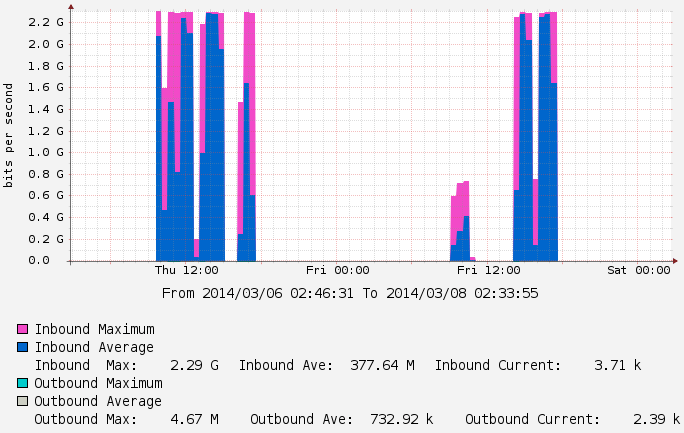
Below is a sample of a recent transfer conducted on one of our Science DMZ networks that is connected at 10G speed. As you can see the performance is far below the expected theoretical max. There are many pieces of equipment that needs to be optimized in order to achieve near-10G speeds:

  1. Storage Array I/O
  2. File System on the Array
  3. NIC on the DTN
  4. Buffers on the DMZ Switch
  5. Buffers on the Border Router
  6. End-to-end Jumbo Frames
  7. Transfer Protocol

2014-03-13_10g_cacti

In this case we found that the local storage array was not able to saturate the network even with 16x1TB SSDs running in RAID5. The resulting transfers peaking around 2.3 GBPS; our tests with perfSONAR showed that our network equipment is capable of pushing up to 9 GBPS.

Achieving 10 Gigabit speeds on a host-to-host transfer is not as simple as I thought as it requires the optimization along many layers of hardware and software. For further information, a detailed list of client optimization steps can be found on the Network Tuning page at fasterdata.es.net.
Introduction to DNS and BIND

This week I attended a two day long session on DNS and BIND hosted by Internet Systems Consortium with Alan Clegg as the instructor. Coming from a background of Active Directory-Integrated DNS, this was a wonderful opportunity to have hands on exposure to BIND.

The class started with topics that covered RFC 799 (1981) and RFC 822/833 (1983), DNS namespace, name resolution, caching, recursion, iteration, and stub resolvers. A major focus of the class was on BIND, which included history, configuration, and hands-on lab time to setup and troubleshoot common BIND issues.

A major benefit of being in the ISC office was the ability to talk to people that operate the F-Root servers. We have the opportunity to engineers about their software life-cycle, patching procedures, common support issues, and thread mitigation techniques.

Interface Message Processor

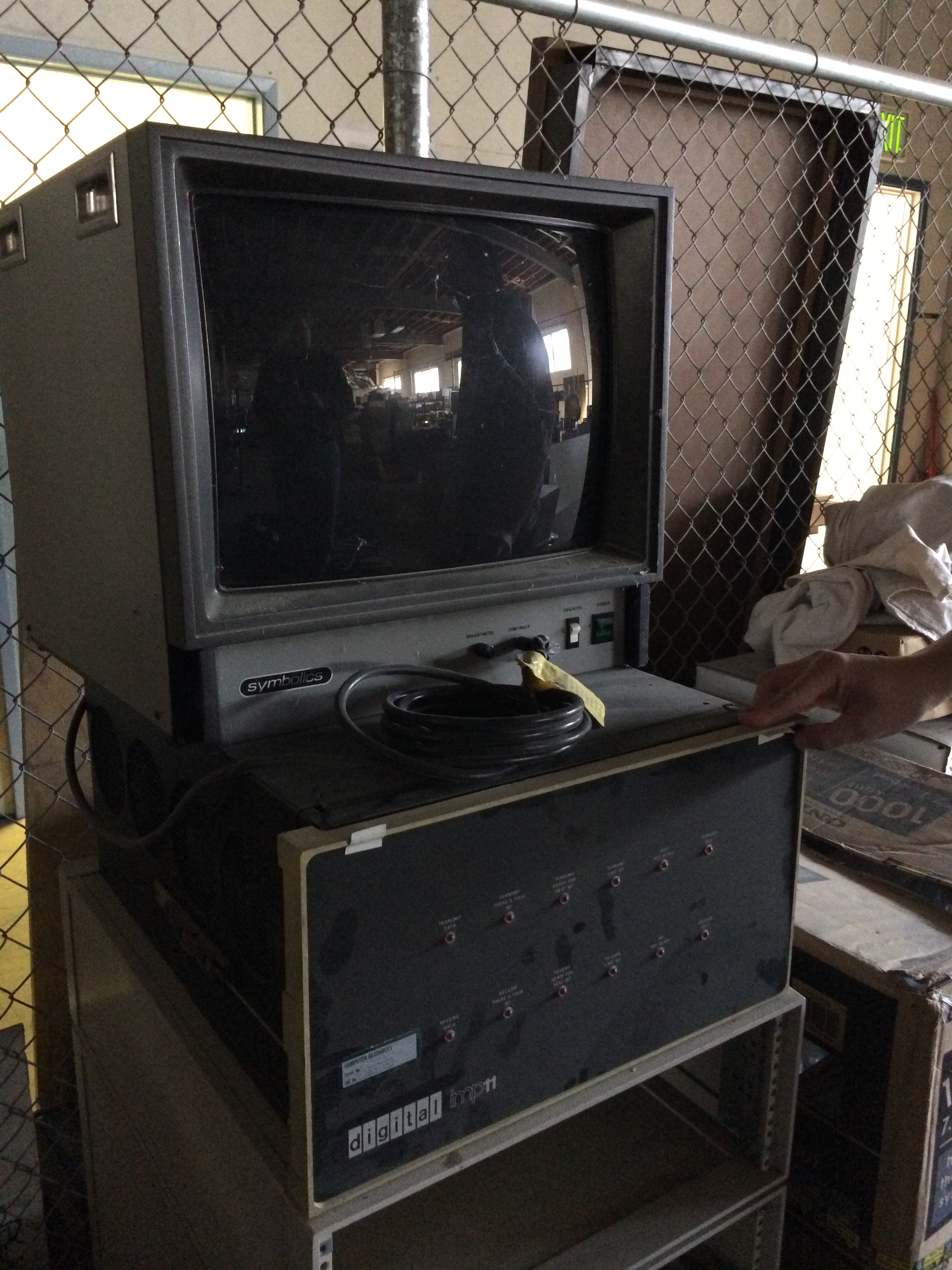
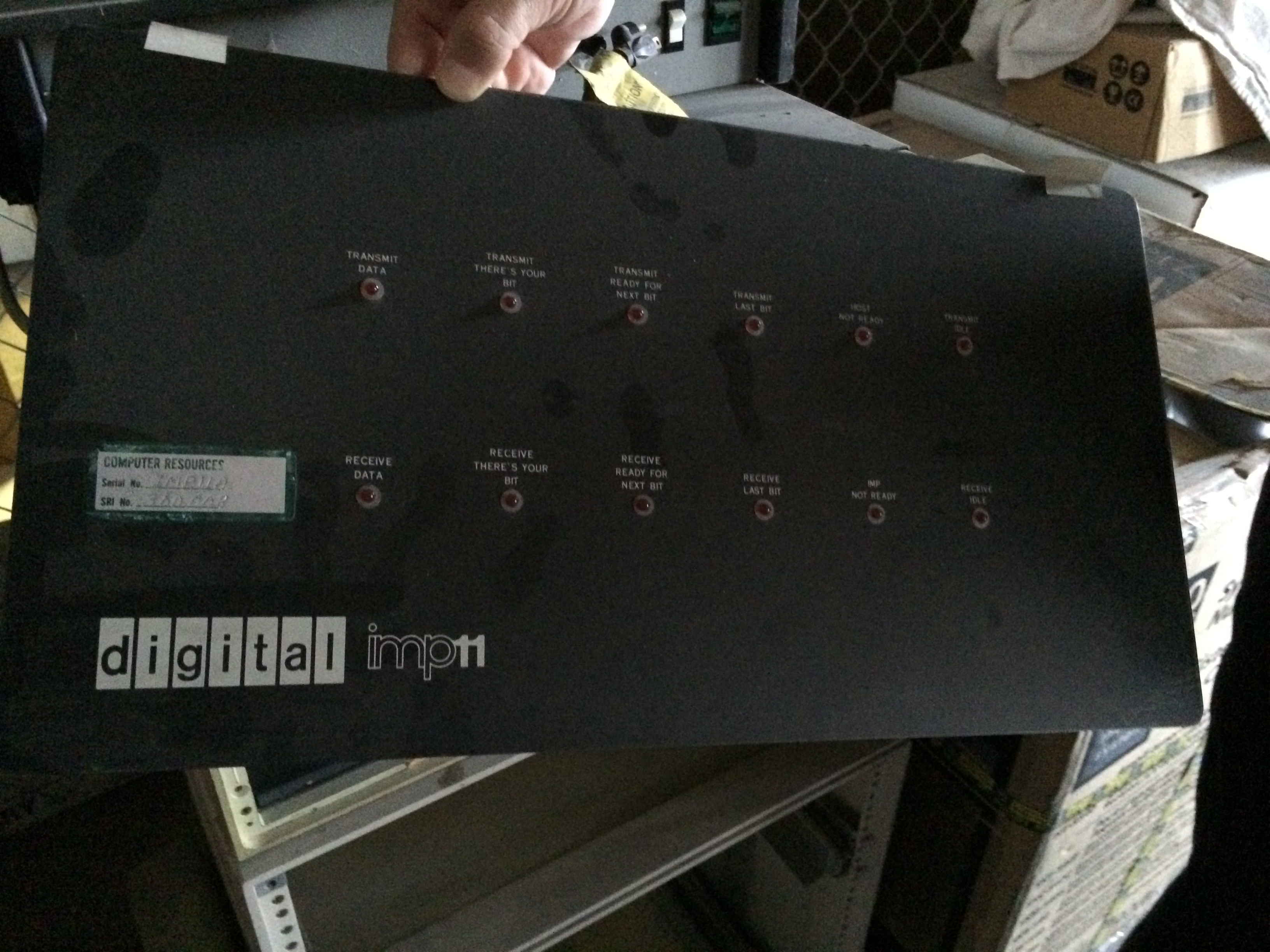
While in Redwood City, CA and I had the chance to get a picture of a former production IMP (Interface Message Processor) from the early 70’s. Reading about the early architecture of ARPANET sparked my interest in telecommunications at an early age; it was a unique opportunity to see one of the first routers that moved traffic in the precursor to the modern day Internet.

IMG_0095

IMG_0091

Based on Report 2059 from Bolt Beranek and Newman Inc. in October of 1970, it looks like IMP #11 was installed at Stanford University for testing on a new 230.4 kilobit/sec circuit in the third quarter of 1970.

Operating Innovative Networks (OIN) Workshop

I had the opportunity to attend a OIN workshop in Berkeley, California this past month. The workshop was hosted onsite at Lawrence Berkeley National Laboratory so I didn’t even need to commute to attend the event.

IMG_20140313_093336

The first day of the program was on Science DMZ architecture, security, and performance using perfSONAR presented by ESnet. Later in the day we discussed Data Transfer Nodes (DTNs) and how Globus helps to enable end-users with big data transfers. The second day focused on 100G Networking, SDN, and OpenFlow followed by hands-on and troubleshooting exercises using HP Procurve switches that supported the OpenFlow 1.0 protocol.

The type of network traffic that I have been working with over the past eight years before starting at Berkeley Lab has been mainly general-purpose business traffic for remote access, site-to-site connectivity, and Internet access. As my entry to the Big Data world is rather new, this was an excellent workshop that help to solidify the design principals of high volume data transfers. The idea of taking a stateful firewall out of the network architecture was a foreign concept to me a few months ago and enabling 10 Gigabit speeds truly requires a different mindset when it comes to design.

Modifying the PoE Budget on Juniper EX2200-C Switches

While bringing up a number of Aruba 135 APs attached to a Juniper EX2200-C PoE+ switch, we noticed that only three out of the seven APs were coming online. Given that the EX2200-C switch has a maximum on paper PoE budget of 100W and our Aruba 135’s are rated at drawing 12.5W, we were confused as to why only three were coming online and not the expected seven as seven would total 87.5W and be within the PoE budget.

The show poe interface command was showing a max power value of 30W per port, which is why we were seeing only three APs power on given the maximum allotment of 100W. The behavior on Juniper PoE switches we saw was that devices on the lowest ports get power first so only the three APs on ge-0/0/0, ge-0/0/1, and ge-0/0/2 power up.

user@ex2200> show poe interface
Interface    Admin       Oper    Max        Priority       Power          Class
             status      status  power                     consumption
ge-0/0/0    Enabled      ON     30W      Low            7.5W            4
ge-0/0/1    Enabled      ON     30W      Low            7.5W            4
...

You can change the maximum-power value assigned to each port under the poe tree. Our solution was to set the poe value to static and define a maxium-power value for our interface group as seen here:

poe {
    management static;
    interface WIRELESS_ACCESS_PORTS {
        maximum-power 14.2;
    }
}

Confirming PoE allocation changes with the show poe interface command:

user@ex2200> show poe interface
Interface    Admin       Oper    Max        Priority       Power          Class
             status      status  power                     consumption
ge-0/0/0    Enabled      ON     14.2W      Low            7.5W            4
ge-0/0/1    Enabled      ON     14.2W      Low            7.5W            4
...

The Aruba datasheet states a maximum draw of 12.5W, but given power loss in the cables, we set the value to a maximum of 14.2W, which is the the maximum we can assign and power seven devices. Typically in this building we only see a 7-10W draw, but we wanted to maximize the allotment.

Juniper JNCIA Training

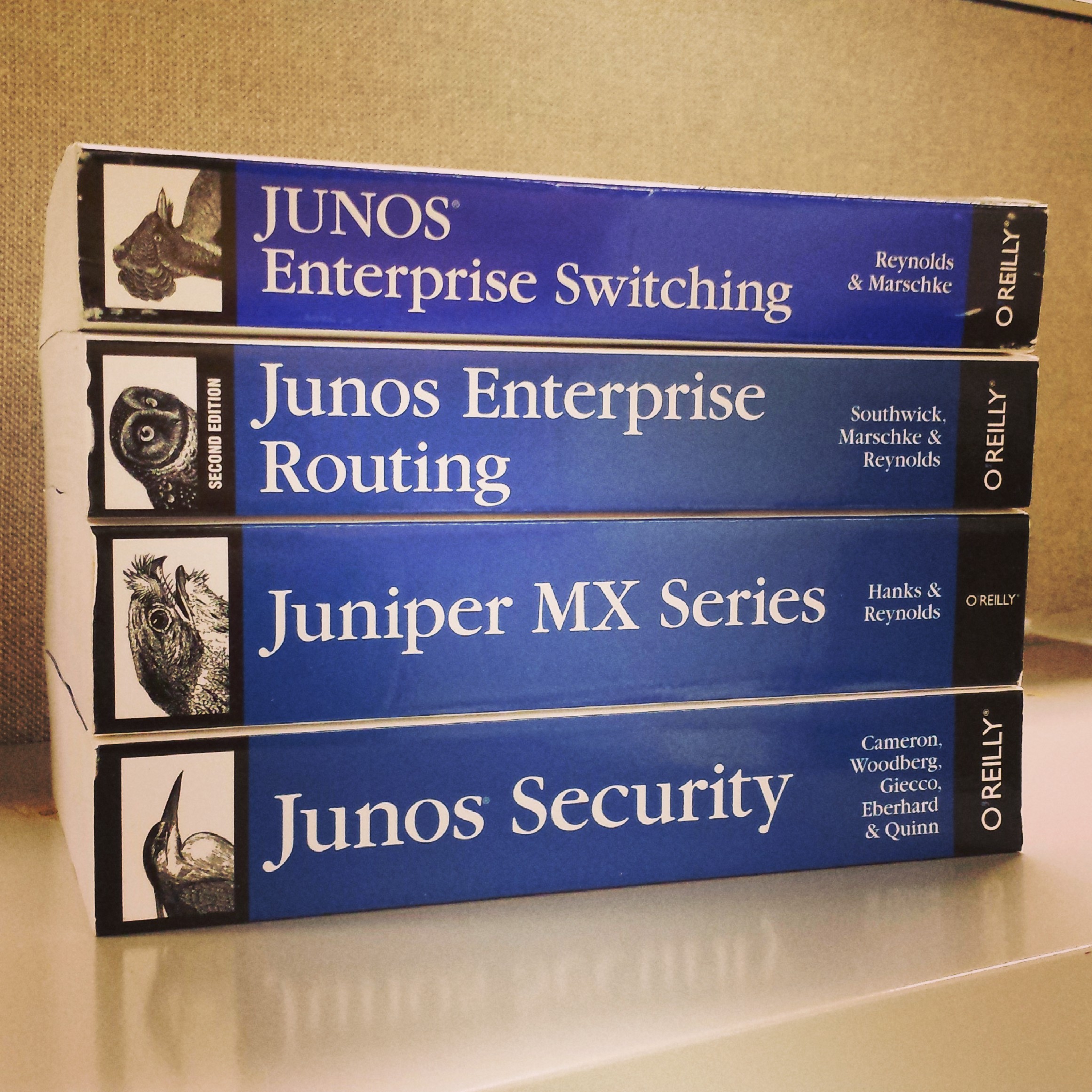
This month I have begun my JNCIA training and hope to take the exam this Spring to further my professional development. I passed the CCNA in September of 2013 and started working with Juniper devices in October of 2013 so the Juniper world is relatively new to me.

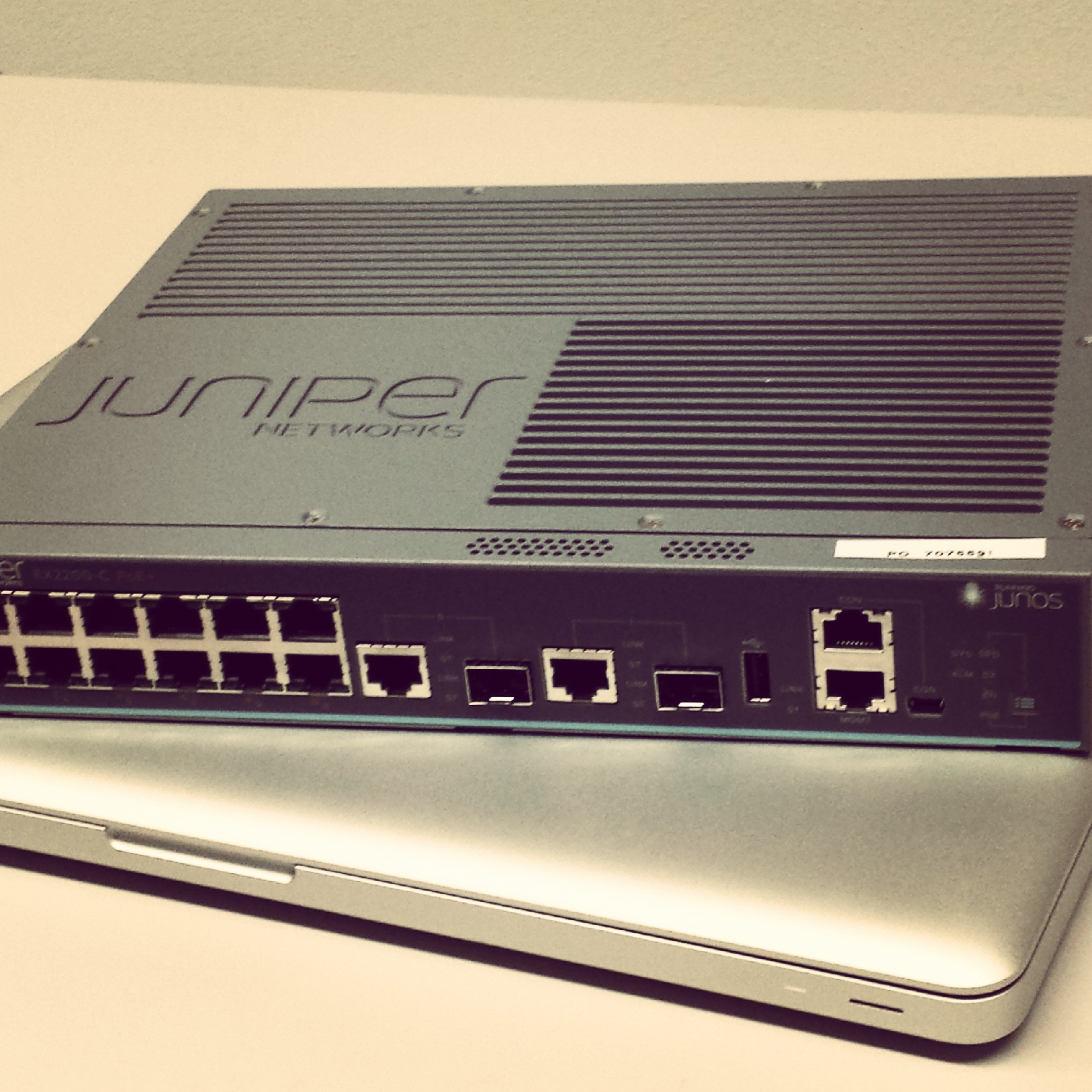
I currently work with EX2200, 3300, and 4200 switches on a daily basis so I hope that the majority of the material in the Juniper Enterprise Switching book will be review and improving my proficiency with JuneOS. A few months ago I even added a EX2200-C to my home setup so I can have more experience with the OS.

IMG_20131106_122218 IMG_20131029_125629

So far I am amazed at the design of the JuneOS platform. The candidate configuration, roll-back, and processor isolation of switching and routing processes is very different than a Cisco device where you are locked into the Cisco shell. I am beginning to see the power of the Juniper world.

Western Digital 4TB Red WD40EFRX Head Parking Issues

These drives went on sale so I decided to pick up one to expand my home lab storage capacity. After doing some research on the Red vs Black edition, I found a few posts that referenced head parking issues in the 4TB Red series that significantly reduce the drive’s lifespan.

http://www.reddit.com/r/DataHoarder/comments/1wcpl7/4tb_hard_drive_wd_black_or_red/
http://forum.wegotserved.com/index.php/topic/29078-wd-4-tb-red-are-apparently-having-head-park-issues/
http://forum.qnap.com/viewtopic.php?f=182&t=83577

Apparently you can run a utility against the drive to correct the issue with idle3 http://idle3-tools.sourceforge.net/

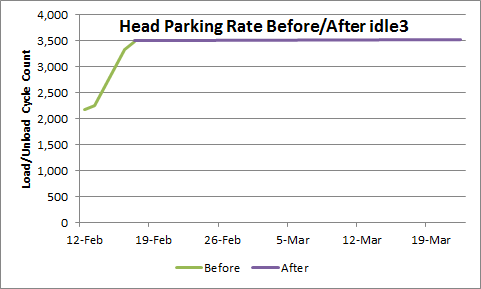
Before setting the idle timer to 0, I was getting 273 Head Parks/day. After the utility was run, I am now showing 0.67 Parks/day.

2014-03-22-wd_red